
How Google’s newest experiment from Google Labs is democratizing app UI design — and what it means for your next campaign
Imagine describing your dream app in plain English — and watching a fully designed, functional user interface materialize in under two minutes. That’s the promise of Google Stitch, one of the most quietly transformative tools to come out of Google I/O 2025. For digital marketers, growth hackers, and app advertisers, Stitch isn’t just a developer toy. It could fundamentally reshape how campaigns are ideated, prototyped, and pitched.
What Is Google Stitch?
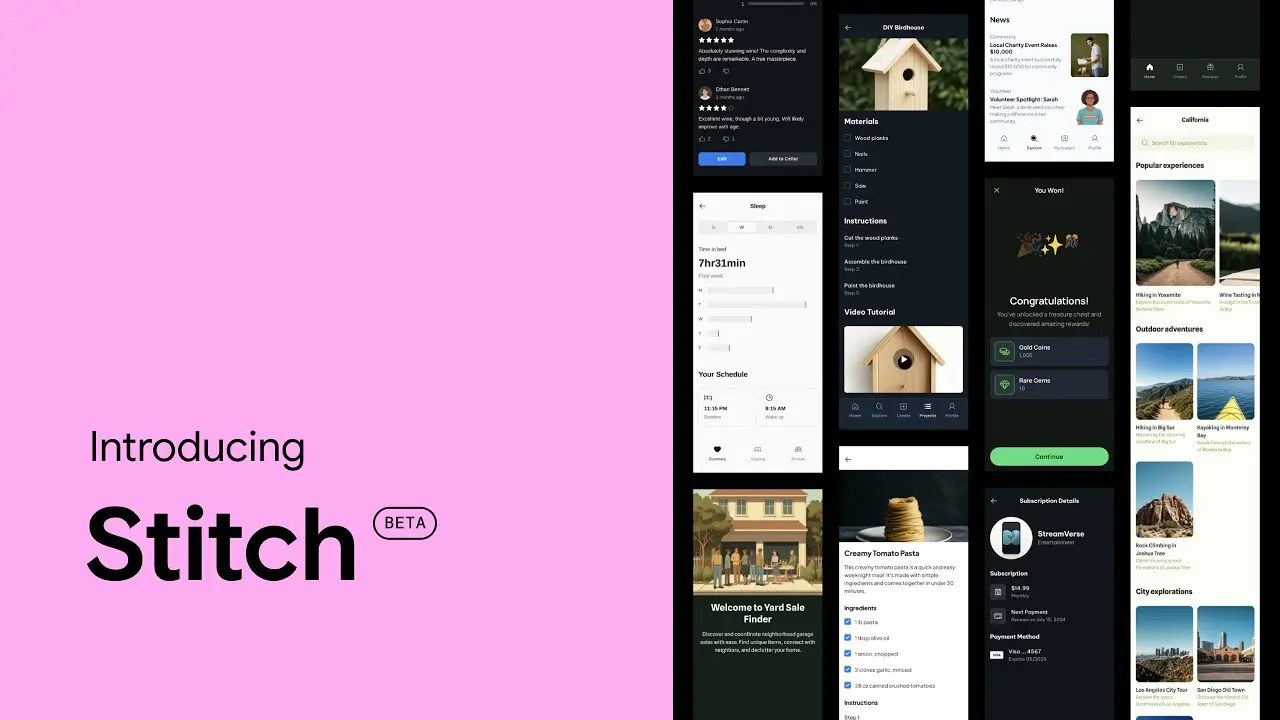
Google Stitch is an AI-powered UI design tool launched at Google I/O in May 2025 as an experiment from Google Labs. Available at stitch.withgoogle.com, it allows anyone — designer, developer, or marketer — to transform simple text prompts or uploaded images into complete user interface designs and production-ready front-end code, in minutes.
The tool was born from a collaboration between a Google designer and a Google engineer who wanted to solve one of the most persistent pain points in modern product development: the frustrating gap between a great idea and a working prototype. Traditionally, going from concept to clickable mockup required either expensive design software skills, a full design team, or weeks of back-and-forth between stakeholders. Stitch collapses that process to a matter of seconds.
At its core, Stitch leverages the multimodal capabilities of Google’s Gemini AI models — the same family of models powering Google’s most advanced AI products. The result is a tool that doesn’t just generate pretty pictures, but understands design principles, responds to conversational feedback, and produces real, exportable front-end code.
Key Fact: Since its debut at Google I/O 2025, Stitch has amassed millions of users and has evolved significantly with major updates including the December 2025 Stitch 2.0 release, which introduced Gemini 3 integration and interactive prototype creation.
The Technology Behind the Magic: Gemini at the Wheel
Stitch is powered by two distinct Gemini AI model configurations, each optimized for a specific workflow:
Standard Mode — Gemini 2.5 Flash
This mode is built for speed and iteration. You type a description, and Stitch generates a working layout almost instantly. It’s ideal for brainstorming sessions, sprint planning, early-stage ideation, and quick client presentations. The free tier allows up to 350 standard generations per month.
Experimental Mode — Gemini 2.5 Pro (and now Gemini 3)
This is the high-fidelity powerhouse. Upload a hand-drawn wireframe, a rough sketch on a whiteboard, or a screenshot of a competitor’s app, and Stitch will interpret it into a polished, detailed digital UI. Following the December 2025 Stitch 2.0 update, this mode was upgraded to Gemini 3, delivering sharper layouts, better color palettes, and more accurate interpretation of visual inputs. Free users get up to 50 experimental generations per month, with a Pro plan offering unlimited access.
What makes Stitch distinctly different from generic AI image generators is its deep specialization in UI/UX. The model understands Material Design 4, follows WCAG accessibility standards, and produces layouts with correct semantic code structure — not just visually appealing screenshots that can’t be used in production.
Core Features: What Stitch Can Actually Do
1. Text-to-UI Generation
The fundamental Stitch workflow is beautifully simple: describe the interface you want in plain English, and the AI builds it. You can be remarkably specific — mentioning color palettes, typography styles, layout preferences, target audience, and interaction patterns. For example: “A dark-mode fitness tracking app with circular progress rings, a bottom navigation bar, and card-based workout history, targeting young adults.” Stitch interprets this and produces a complete, multi-element layout.
2. Image-to-UI Conversion
One of Stitch’s most powerful features for teams is its ability to turn visual references into functional interfaces. You can upload a photo of a hand-drawn sketch on a napkin, a screenshot of an app you admire, or a rough wireframe built in another tool, and Stitch will translate it into a clean, code-ready digital design. This is a game-changer for agency workflows, where client briefs often arrive as rough sketches or mood boards.
3. Iterative Refinement via Chat
Stitch doesn’t just generate a single output and call it done. It facilitates a conversational design process. You can issue follow-up prompts like “make the background darker,” “change the call-to-action button to orange,” or “add a search bar at the top” — and the AI will refine the design in real time. This iterative loop is central to how professional designers actually work, and Stitch integrates it naturally.
4. Multiple Variants
Need to A/B test different UI directions before committing to one? Stitch lets you generate multiple design variants from the same brief, allowing your team to compare layouts, component choices, and visual styles side by side. For app marketers who routinely test creative assets, this feature has obvious appeal.
5. Figma Integration — Paste to Figma
For design teams already working inside Figma, Stitch offers seamless export. Generated designs can be pasted directly into Figma as editable layers with auto-layout, where they can be refined, annotated, shared with clients, and handed off to development teams. This bridge between AI generation and professional design tooling is one of Stitch’s most practically useful features.
6. Front-End Code Export
Perhaps most importantly for developers, Stitch doesn’t just produce images — it produces clean, functional HTML and CSS (and increasingly React) code based on the generated design. This means a UI that looks good in Stitch can become the actual front end of a working application, without a developer needing to build it from scratch. The December 2025 update added free React code generation, significantly expanding Stitch’s usefulness for modern web and app development.
7. Interactive Prototypes (December 2025 Update)
The Stitch 2.0 update introduced the Prototypes feature, transforming the tool from a single-screen generator into a full prototyping platform. You can now design multiple related screens within a single project and link them together into interactive user flows. This positions Stitch as a genuine competitor to dedicated prototyping tools like InVision, Marvel, and Figma’s native prototyping capabilities.
Pro Tip: Use Stitch’s Experimental Mode with a screenshot of your top competitor’s app UI to rapidly generate a differentiated design direction. The AI will interpret the structure and layout while giving you a fresh starting point, saving hours of manual wireframing.
What This Means for Digital Marketers and App Advertisers
Most coverage of Google Stitch has focused on its implications for designers and developers. But for professionals in digital marketing, growth marketing, and app advertising, the implications are equally profound — and in some ways, even more immediately actionable.
Faster Creative Testing Cycles
In mobile app advertising, the ability to rapidly create and test multiple creative assets is directly linked to campaign performance. App install campaigns on platforms like Google UAC (Universal App Campaigns), Meta Advantage+, and Apple Search Ads are heavily driven by creative variation — the more variants you test, the faster you find winning combinations.
Stitch dramatically compresses the time required to produce new app UI mockups for ad creatives. Instead of commissioning a designer to produce ten different versions of an onboarding screen, a marketing team can generate ten variants in an afternoon, select the most compelling visuals, and use them directly in ad campaigns. The quality won’t be final-production-ready, but it’s more than sufficient for early-stage creative testing.
Democratizing App Prototyping for Marketing Teams
Historically, one of the biggest bottlenecks in app marketing has been the dependency on engineering and design resources. A marketing manager who wants to test a new landing page flow, a new onboarding experience, or a new feature highlight often has to join a backlog queue and wait weeks for developer time.
Stitch changes this dynamic. With a tool that anyone with a Google account can access for free, marketing professionals can prototype app experiences without needing to touch code or own Figma licenses. This empowers marketing teams to iterate on user journey concepts, present concrete interactive prototypes in client pitches, and validate ideas before investing in full production.
Pitch Decks and Client Presentations That Convert
For agencies working on app advertising campaigns, one of the most valuable applications of Stitch is the ability to produce high-quality visual mockups for client presentations — fast. Instead of showing wireframes or generic stock UI screenshots, agencies can generate custom, branded app interfaces that visually represent the campaign concept. Clients respond dramatically better to concrete visual representations than abstract strategy slides.
Several agencies have reported using Stitch to cut their pitch deck production time by as much as 70%, generating interactive prototype-style presentations that demonstrate proposed app experiences before a single line of production code is written.
App Store Optimization (ASO) Creative
Google Stitch can also play a role in App Store Optimization workflows. App store screenshots — the visual assets displayed on Google Play and the Apple App Store — are among the most impactful conversion drivers for organic app discovery. Stitch can be used to generate concept designs for screenshot layouts, allowing ASO specialists to rapidly prototype different screenshot storylines before commissioning final graphic design work.
Competitive Intelligence and Reverse Engineering
The image-to-UI feature opens up an interesting application for competitive analysis. Marketers can upload screenshots of competitor apps and use Stitch to generate similar interface designs with variations, helping them understand design patterns that are working in their category and rapidly produce alternatives. While ethical use must always guide this practice, it’s a powerful input to any competitive intelligence workflow.
Stitch in the Context of the Broader ‘Vibe Coding’ Movement
Google Stitch arrived at a moment of explosive growth in what the tech industry has started calling ‘vibe coding’ — a term describing the use of AI models to generate code and interfaces from natural language descriptions, without requiring deep technical knowledge.
The vibe coding space is crowded and intensely competitive. Cursor (from Anysphere), Cognition, and Windsurf have attracted significant investment. OpenAI launched its Codex service in May 2025. Microsoft rolled out major updates to GitHub Copilot. In this landscape, where does Stitch fit?
Stitch occupies a deliberate niche: it’s not trying to be a full-fledged code editor or a complete development environment. Google’s own product manager Kathy Korevec described it as the place “where you can come and get your initial iteration done, and then you can keep going from there.” Stitch is positioned as the front door to the app-building process — the fastest possible path from idea to tangible visual — rather than the entire house.
This positioning makes Stitch particularly interesting for non-engineers. While Cursor and Copilot are ultimately aimed at developers who want to code faster, Stitch is aimed at anyone who wants to see what their idea looks like before deciding whether to build it. That’s a much broader audience — and it includes a huge chunk of the marketing and advertising community.
Pricing: Free, Generous, and Growing
One of Stitch’s most significant competitive advantages, especially for smaller agencies, startups, and individual marketers, is its pricing. As of early 2026, Stitch remains free to use with a Google account, with the following monthly generation limits:
- 350 Standard Mode (Gemini 2.5 Flash) generations per month
- 50 Experimental Mode (Gemini 2.5 Pro / Gemini 3) generations per month
- Full access to Figma export, code export, and prototype features
A Pro plan has been introduced at $20/month, which unlocks unlimited generations, priority processing, and upcoming features including offline Progressive Web App (PWA) mode and enterprise-grade team collaboration features.
For the vast majority of marketing use cases — ideating campaign concepts, generating client presentation mockups, producing ASO creative concepts — the free tier is more than sufficient. The Pro plan makes more sense for agencies using Stitch as a core production tool or for development teams needing high-volume generation.
Free Tier Breakdown: 350 standard + 50 experimental generations per month = plenty of runway for most marketing teams. Limits reset on the 1st of each month, and usage can be tracked directly from the Stitch dashboard.
How to Get Started: A Step-by-Step Guide for Marketers
Getting started with Stitch takes less than five minutes:
- Go to stitch.withgoogle.com and sign in with your Google account.
- Click ‘Start a new design’ and choose your mode (Standard for speed, Experimental for depth).
- Select Mobile or Web as your layout target.
- Type your prompt — be specific about colors, tone, audience, and key UI elements.
- Review the generated design and use chat prompts to refine it iteratively.
- Export to Figma for further refinement or download the HTML/CSS code for direct use.
For marketers using Stitch for campaign creative, the recommended workflow is: generate 5–10 UI variants in Standard Mode, identify the 2–3 strongest visual directions, then invest Experimental Mode credits in refining those shortlisted concepts.
Limitations and Honest Caveats
Stitch is impressive — but it’s important to go in with calibrated expectations, especially if your use case requires production-quality, pixel-perfect design.
Output Quality Is Mid-Fidelity by Default
Stitch’s default outputs tend to be what designers call ‘mid-fidelity’ mockups — clear, structured, and coherent, but not immediately production-ready. Alignment issues, generic-looking typography, and color drift from specified brand systems are common. The AI-generated layouts typically require meaningful human refinement before they’re suitable for final app store screenshots, ad campaigns, or development handoff. For ideation and prototyping, this is fine. For production assets, factor in iteration time.
Complex Multi-Screen Flows Still Need Human Guidance
While the December 2025 Prototypes update dramatically improved Stitch’s multi-screen capabilities, designing sophisticated user flows — especially those with conditional logic, complex navigation patterns, or highly branded experiences — still benefits from human design judgment. Stitch is a powerful accelerant, not a replacement for experienced UI/UX thinking.
Not a Full-Fledged Design Platform
Stitch is intentionally not Figma or Adobe XD. It lacks the granular control, component libraries, and collaborative features of professional design tools. For teams with mature design systems, Stitch is most useful as an upstream ideation tool that feeds into those platforms, rather than as a standalone solution.
Generation Limits on the Free Tier
The 50 Experimental Mode generations per month can feel restrictive if you’re using Stitch intensively for client work. Teams doing high-volume client pitching may find themselves needing the Pro plan fairly quickly.
Google Stitch vs. the Competition
The AI-powered UI design space has become crowded rapidly. Here’s how Stitch compares to its most notable competitors:
Stitch vs. Figma AI (formerly Figma Make)
Figma’s AI features are deeply embedded within the Figma ecosystem, making them more powerful for teams already using Figma extensively. However, Figma AI is only accessible to Figma subscribers, while Stitch is free. Stitch is a better entry point for teams without Figma licenses or for solo practitioners.
Stitch vs. Uizard
Uizard was an early pioneer in AI-powered mockup generation. Stitch outperforms Uizard in raw generation quality thanks to Gemini’s multimodal capabilities, but Uizard has more polished collaboration features. For pure design generation, Stitch has pulled ahead.
Stitch vs. UX Pilot
UX Pilot is often cited as offering more consistent output quality for production-ready designs, particularly for multi-screen flows. Stitch offers the advantage of Google’s backing, deeper Gemini integration, and a more generous free tier.
Stitch vs. Framer AI / Webflow AI
These tools focus more on web publishing and live site generation rather than app UI prototyping. For app marketing and mobile-first design use cases, Stitch is more directly relevant.
The Bigger Picture: What Stitch Signals for Marketing and Advertising
Google Stitch is not just a design tool. It’s a signal about where the entire marketing technology landscape is heading.
The democratization of UI creation is part of a broader trend: the steady erosion of the technical skill barriers that have historically gatekept product development from non-engineers. First it was landing page builders like Squarespace and Webflow. Then no-code app builders like Bubble. Now it’s AI-powered design tools like Stitch that let a marketing manager with no design training produce a working app prototype in an afternoon.
For digital marketing agencies, this shift has profound implications. The competitive advantage will increasingly belong to teams that can move fastest from brief to prototype — not teams with the most designers on staff. Agencies that build Stitch (and tools like it) into their pitch workflows will be able to produce more compelling, concrete client presentations in less time, at lower cost.
For app advertisers specifically, the ability to rapidly generate, test, and iterate on UI concepts without engineering dependencies unlocks a faster creative velocity that has a direct impact on campaign performance. In a world where Meta and Google’s ad algorithms increasingly favor high-volume creative testing, tools that accelerate creative production are a direct competitive weapon.
And for brands building or maintaining mobile apps, Stitch provides a cost-effective way to explore product evolution concepts, test potential redesigns, and visualize feature additions — before committing a single development sprint.
Looking Ahead: With Google’s February 2026 enterprise rollout bringing SOC2 compliance, team collaboration tools, and API endpoints, Stitch is clearly on a trajectory from Labs experiment to serious enterprise product. Agencies and marketing teams that build fluency with it now will have a meaningful head start.
Should You Add Stitch to Your Marketing Stack?
The short answer is yes — and the barrier to trying it couldn’t be lower. Stitch is free, requires only a Google account, and delivers genuinely useful outputs within minutes of first use. For digital marketers, the question isn’t whether to try Stitch, but how to integrate it most effectively into existing workflows.
For agencies, the highest-value use cases are client pitch prototyping, creative testing ideation, and competitive analysis. For in-house marketing teams, rapid UI concept validation and ASO creative generation represent the most immediate wins. For entrepreneurs and solo marketers building apps, Stitch is arguably the most powerful no-code design tool currently available, free of charge.
Is it perfect? No. Mid-fidelity outputs, limited production polish, and a free tier that can feel constrained for heavy users are real limitations. But as a front-of-the-funnel ideation tool — the bridge between an idea and a stakeholder-ready visual — Stitch is remarkably good, and it’s getting better with every update.
In the fast-moving world of app marketing, speed of iteration is often the difference between campaigns that win and campaigns that wait. Google Stitch is one of the sharpest new tools for moving faster. It’s time to start stitching.
Comments are closed